RiftMode
Many of us have had our experiences with the survivor horror genre. For anyone who has played, know that you need to watch your inventory while you try not to die with what is around the corner. There are times when every move seems like an unsurvivable outcome, while others may be challenged by the puzzles they encounter. But does developer Team Vultures show us what happens when you take the genre and add tactical turn-based strategy while trying to find a cure for saving humanity? Let’s find out with Vultures – Scavengers of Death for the PC.
Vultures – Scavengers of Death is a tactical turn-based survival horror inspired by 90s survival horror classics. As an operative, scavenge the infested metropolis for materials and information that could cure the infection plaguing the world. Salento Valley, post-bio-hazard incident. As a VULTURE operative, your mission is to extract material to aid in finding a cure for the infection. Send Leopoldo and Amber on their select missions and prepare for turn-based tactical survival against infected mutants. Find the key to our salvation.
Now, before you go in trying to save the world, because we all know the world does need some saving, there are a few things you will want to make sure of. First, you will want to go into settings. Here is where you can choose whether to show the grid in combat only, your language, game resolution, and volume settings and controls. Make sure that you select full screen, as well as selecting the right game resolution for your monitor, with the highest selection showing to be 2560×1440. For the controls, no option for a controller here, as you will need to use your mouse and keyboard. Second, take your time and use the map to your advantage. And finally, I am not going to spoil anything for anyone. So with all that said, let’s continue…
When the game starts, we find out it’s the year 1993, February 1993 to be exact, and that Salento Valley, once the world’s industrial center, has fallen into chaos after a massive explosion, and as the hours passed, the population of what everyone knew had changed and turned into zombies. This can only mean one thing: total quarantine. As fun as total quarantine had become, a client has contacted the Vulutures with an offer that could not be refused: head into the city, determine the source of the infection, and hopefully, secure the cure to everyone’s problem, zombies.
Now that you are current with the situation, I know what you must be thinking: “Let’s get those zombies.” As much fun as it would be to start taking care of them, you do have to do a few things. First, we have Satsuki. She is our point of contact. Even though she is in a wheelchair, she is still an important part of Team Vultures. There are two main characters that you will control, Leopoldo and Amber. Depending on the mission, it is determined who you will be playing as. One thing you will notice about Satsuki, Leopoldo, and Amber is that they like to keep the circulation going even while in one spot, as they like to do partial squats. Hey, you gotta keep the blood flowing somehow when there is total quarantine and zombies.
As with anyone who is going to be facing who knows what, it’s always a good idea to have some training, and Team Vultures is all about being prepared for the moment. With the training, you will learn a variety of skills that will help you along the way. When you are on a mission, you will notice in the bottom-right of the screen that you will have the number of steps you have left before your turn ends. As you move, the diamonds start reducing. Luckily, you can see how many steps it will take before deciding. This will come in handy when you have a handful of zombies and when you decide if attacking or walking away is the best strategy. Anything with a white circle can be inspected. This comes in handy when you may find some ammo, health, and other objects. Some doors you come across can easily be opened, while others may be blocked or locked, where you will need to find a key to unlock them.
For movement, you have a choice with Leopaldo of walking, running, or sneaking. With Amber, you can do the same, but she also has a grappling gun that can be shot at enemies for that extra special attack. Sneaking around does come in handy when you see zombies standing or sitting around. This makes it easy if you want to do a quick attack before the combat starts. Here, you can attack with your default knife or switch to your gun. You will need to be careful, as you do not have unlimited bullets, which falls into the strategy of things. One of the cool things you can do is not just stab or shoot, but you can select which part of the body you want to aim for. Different parts of the body cause different damage to the enemy. Luckily, you can see how much damage the enemy has taken and how much they have left until they are defeated. While in combat, you will need to pay attention to the top-left of the screen where your AP and MP points are shown. AP is your attack points, and this covers anything from attacking, reloading, healing, etc., but you can only use 3 AP points per turn. The MP points are your movement points. Going forward, backward, or to the side costs fewer points than going diagonally.
Under the AP and MP points, you will see a list of what you can do, showing how many points each takes. Do you want to move as far as possible, or do you want to stay and fight? Depending on the points and what may show up, it really does come down to the strategy of how you will handle each combat session.
As you move from location to location, you will have the opportunity to save when computers are found, drink water from the cooler to restore your health, which is not unlimited, and find trunks where you can stash items that you are carrying to make room for new items you may find. There is also a market for you to purchase items, such as a helmet, to help you against blindness from those enemies that can impact your vision. There are also other weapons to obtain, such as the shotgun, which is nice up close, assault rifles when you need to try and take down those further away enemies, and even being able to throw explosives to electrocute enemies, for example.
Through each mission, you will have goals that you need to accomplish. And to help you keep track of everything, pressing M or 2 will get you to the map. To the left, you also have your inventory, journal, load, settings, and abort mission. Pressing ESC will escape back from the map; you can quit to the title or even close the game. When you click on goals, you can see which goals you have already completed and which ones are still left to do. One of the things I like is how you can click on a goal that has not been completed, and then click to locate it on the map. This will show you the area where the goal is and where you need to go (inside the red box is the current goal). Keep in mind, not everything is going to be a straight shot, and the goal you need to get to can be on the other side of the map from where you currently may be.

Let’s talk about the graphics and sound. In looking at the visuals, you can see a lot of homage to those older games that came before it, including the puzzles, which is part of its charm that I really enjoyed and appreciate. Seeing explosions and the way the shooting mechanics worked brought back some old PC, PS1, and Xbox 360, and even platforms before that, some of the fond memories I had playing, and that kept me wanting to keep playing here.
That same attention to detail carries over into the music and sound design, which work together to create an atmosphere that rarely gives you a chance to relax. Even the safe room music, while noticeably calmer than most of the soundtrack, still has an underlying sense of unease that keeps you on edge. That tension is amplified by every distant zombie groan, the sickening thud of a successful hit, and the sharp crack of gunfire echoing through narrow hallways. Combined, these elements create a soundscape that is both immersive and deeply unsettling. From the low, ominous hum of the background music to the aggressive snarls of enemies and even the simple click of a door unlocking, every sound serves a purpose and helps draw you further into the experience.
There are a few things I would love to see. First, the ability to select any character to go on any mission. There were times I wished I had Amber’s grappling gun, as it would have helped in certain situations. Or even additional playable characters that were added. Second, the characters’ voices. And what I mean by that is, well, they grunt. Sure, there dialog is out there for you to read, which I love here, so I wonder what would happen if they were made to be less grunty and a little more Ucey at times. There were times I wanted to take the grunts with the zombie growls and see what kind of beat that could become. And finally, more goals. Yes, that would make the game longer, but would that be a bad thing?
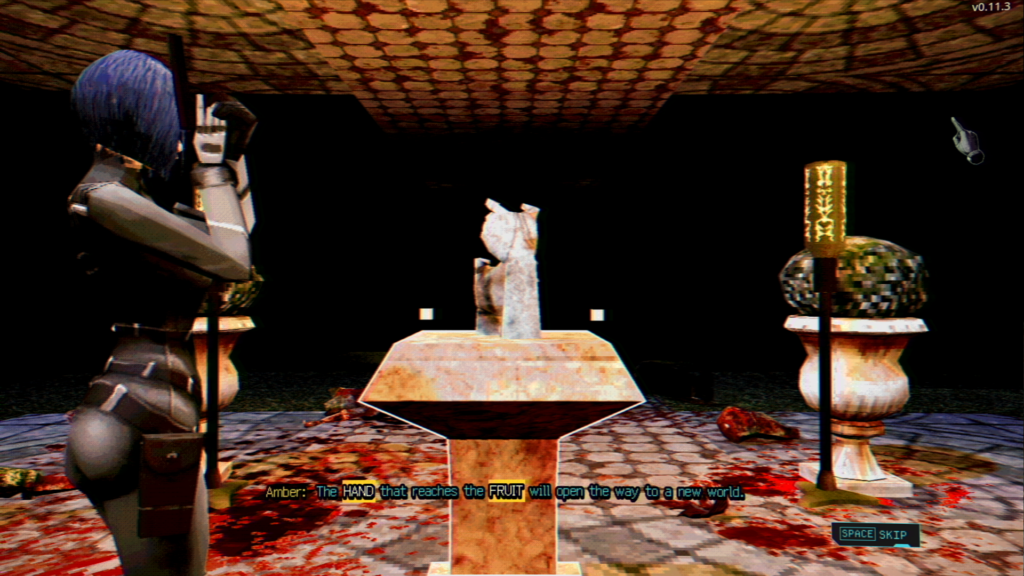
Vultures – Scavengers of Death shows us that bringing back how things used to be can make them that much more enjoyable today. At times, we become so focused on chasing the next big innovation that we overlook what made older experiences memorable in the first place. By embracing classic design philosophies while still feeling fresh and engaging, we are reminded that growth isn’t always about chasing something new—sometimes it’s about rediscovering the strengths we’ve forgotten along the way, and couldn’t we all take a moment to reflect on our own past to help us find a better path forward?
Vultures – Scavengers of Death is out now for PC via Steam. A review code was provided.
To learn more about Team Vultures, please visit the site and follow them on X.
In case you missed the trailer, please enjoy. Until next time, I have a few more things left to do — and until the Rift opens again, know that you are appreciated.