
 Mr. PSVR/2
The PlayStation VR2 was a game-changer from the start. Its impressive specs, from the display to the haptic feedback, create truly immersive experiences. But gamers couldn’t help but wonder: Could this cutting-edge tech be harnessed for PCVR titles too? The wait is over! PlayStation VR2 owners can now expand their virtual horizons with PC compatibility. The highly anticipated PC adapter is finally here, opening up a vast library of PCVR games. Get ready to immerse yourself in new worlds and experiences. To get started, you’ll need a few essential items.
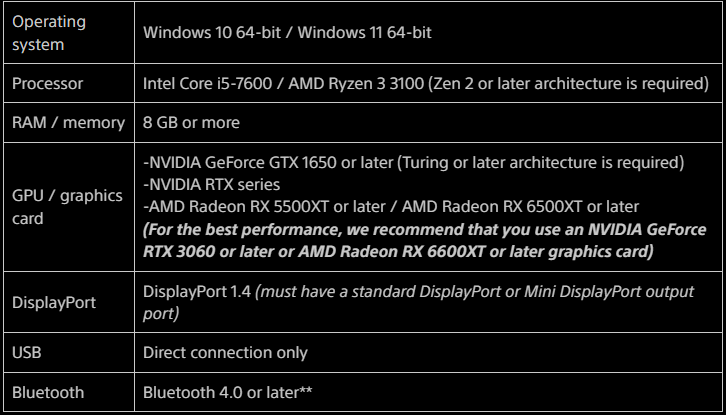
Before you dive in, ensure your PC meets the following requirements:
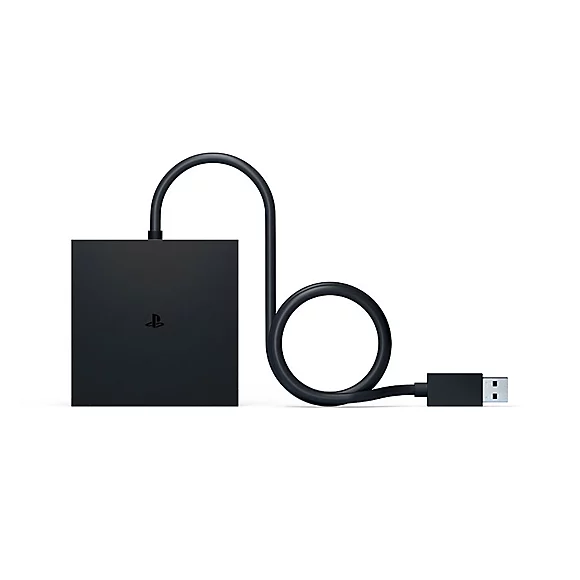
Next, get your software in order. Download and install Steam, followed by SteamVR and the PlayStation VR2 app. And of course, you’ll need the PlayStation VR2 PC Adapter.
Setting Up Your PlayStation VR2 on PC:
It’s easy to get started. Connect your headset to the adapter, then plug the adapter into your PC’s USB 3.0 port. Use a DisplayPort 1.41 cable (not included) to connect the adapter to your graphics card. Don’t forget to plug in the AC adapter. Next, pair your Sense controllers to your PC via Bluetooth. Finally, set up your play area for a safe and immersive experience. You’re now ready to dive into the world of PCVR!
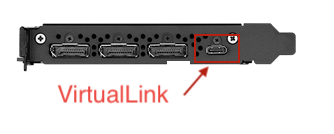
Want to save some cash? If you’re not keen on buying the PlayStation VR2 adapter, you might be in luck. Certain graphics cards, like the RTX 2060-2080Ti, Radeon VII, RX 6000, or RX 7000 series, have a VirtualLink port. This means you can connect your PlayStation VR2 headset directly to your PC without needing the adapter, potentially saving you $59.99.
NVIDIA GPUs:
- GeForce RTX 2060
- GeForce RTX 2070
- GeForce RTX 2070 SUPER
- GeForce RTX 2080
- GeForce RTX 2080 SUPER
- GeForce RTX 2080 Ti
- Quadro RTX 4000
- Quadro RTX 5000
- Quadro RTX 6000
- Quadro RTX 8000
AMD GPUs:
- Radeon VII
- Radeon RX 6000
- Radeon RX 7000
A Word of Caution: While using your PlayStation VR2 with a PC offers expanded gaming options, it’s important to note that some features might be limited.
Currently, unsupported features include…
- HDR
- Headset Feedback
- Eye Tracking
- Adaptive Triggers
- Haptic Feedback
Currently, supported features include:
- Rumble
- 4K Visuals
- 110° Field of View
- Finger Touch Detection
- See-through View
- Foveated Rendering
- 3D Audio in Supported Games
So there you have it. Will you be getting the PlayStation VR2 PC Adapter and trying out those 4K visuals on PCVR?
The decision is yours. Will you enhance your VR experience with the PlayStation VR2 PC Adapter and explore the stunning world of PCVR in 4K?
Until our next journey through the time tunnel, happy gaming and remember to game through time.
